I have a field to input 6 numbers, here's what it looks like:
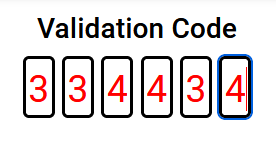
And I'd like to have the form submitted as soon as the 6th number has been added but I don't know how to use JS and everything seems to be using JS to do this.
Of course, the goal would be to use C# to do this if possible or to be able for the JS code to communicate with the C# code.
So far, the code makes it so that when I click on the inputs, it starts at the first one, and after each number input, it moves onto the next.But how could I not only submit the form upon entering the last number, but also get these numbers into a variable or a property that could be used in a submit function ?
Every answer I looked for was in JS and I don't understand anything when it's JS. I don't even understand the JS I'm using but it works so far and as bad as I know it is not to fully be in control of your code unfortunately I couldn't find any example in C#.
Here's the code associated to it:
CodeValidation.cs:
<div class="card text-center "><div class="card-body"><EditForm Model="Code" OnValidSubmit="@VerifyCode" FormName="one-time-code" class="otc"><fieldset><!-- https://developer.apple.com/documentation/security/password_autofill/enabling_password_autofill_on_an_html_input_element --><div><input type="number" pattern="[0-9]*" value="" inputtype="numeric" autocomplete="one-time-code" id="otc-1" required><!-- Autocomplete not to put on other input --><input type="number" pattern="[0-9]*" min="0" max="9" maxlength="1" value="" inputtype="numeric" id="otc-2" required><input type="number" pattern="[0-9]*" min="0" max="9" maxlength="1" value="" inputtype="numeric" id="otc-3" required><input type="number" pattern="[0-9]*" min="0" max="9" maxlength="1" value="" inputtype="numeric" id="otc-4" required><input type="number" pattern="[0-9]*" min="0" max="9" maxlength="1" value="" inputtype="numeric" id="otc-5" required><input type="number" pattern="[0-9]*" min="0" max="9" maxlength="1" value="" inputtype="numeric" id="otc-6" required></div></fieldset></EditForm></div></div>let in1 = document.getElementById('otc-1'), ins = document.querySelectorAll('input[type="number"]'), splitNumber = function(e) { let data = e.data || e.target.value; // Chrome doesn't get the e.data, it's always empty, fallback to value then. if (!data) return; // Shouldn't happen, just in case. if (data.length === 1) return; // Here is a normal behavior, not a paste action. popuNext(e.target, data); //for (i = 0; i < data.length; i++ ) { ins[i].value = data[i]; } }, popuNext = function(el, data) { el.value = data[0]; // Apply first item to first input data = data.substring(1); // remove the first char. if (el.nextElementSibling && data.length) { // Do the same with the next element and next data popuNext(el.nextElementSibling, data); } };ins.forEach(function(input) { /** * Control on keyup to catch what the user intent to do. * I could have check for numeric key only here, but I didn't. */ input.addEventListener('keyup', function(e) { // Break if Shift, Tab, CMD, Option, Control. if (e.keyCode === 16 || e.keyCode == 9 || e.keyCode == 224 || e.keyCode == 18 || e.keyCode == 17) { return; } // On Backspace or left arrow, go to the previous field. if ((e.keyCode === 8 || e.keyCode === 37) && this.previousElementSibling && this.previousElementSibling.tagName === "INPUT") { this.previousElementSibling.select(); } else if (e.keyCode !== 8 && this.nextElementSibling) { this.nextElementSibling.select(); } // If the target is populated to quickly, value length can be > 1 if (e.target.value.length > 1) { splitNumber(e); } }); /** * Better control on Focus * - don't allow focus on other field if the first one is empty * - don't allow focus on field if the previous one if empty (debatable) * - get the focus on the first empty field */ input.addEventListener('focus', function(e) { // If the focus element is the first one, do nothing if (this === in1) return; // If value of input 1 is empty, focus it. if (in1.value == '') { in1.focus(); } // If value of a previous input is empty, focus it. // To remove if you don't wanna force user respecting the fields order. if (this.previousElementSibling.value == '') { this.previousElementSibling.focus(); } });});/** * Handle copy/paste of a big number. * It catches the value pasted on the first field and spread it into the inputs. */in1.addEventListener('input', splitNumber);<div class="card text-center"><div class="card-body"><form name="one-time-code" class="otc" onsubmit="verifyCode(event)"><fieldset><div><input type="number" pattern="[0-9]*" autocomplete="one-time-code" id="otc-1" required><!-- Autocomplete not to put on other input --><input type="number" pattern="[0-9]*" min="0" max="9" maxlength="1" id="otc-2" required><input type="number" pattern="[0-9]*" min="0" max="9" maxlength="1" id="otc-3" required><input type="number" pattern="[0-9]*" min="0" max="9" maxlength="1" id="otc-4" required><input type="number" pattern="[0-9]*" min="0" max="9" maxlength="1" id="otc-5" required><input type="number" pattern="[0-9]*" min="0" max="9" maxlength="1" id="otc-6" required></div></fieldset></form></div></div>